14-Day Returns* · 2-Year Warranty · Worldwide Shipping, US included

HydroSim

HydroSim is a free online hydroplane racing simulator that lets players experience high-speed boat racing with realistic water physics, competitive events, and OWO haptic feedback through SimHub integration.

OWO Compatibility

SimHub

Platform Compatibility

PC

Genre

Racing, Simulation

Available on

OWO implementation guide for HydroSim

SIMHUB INSTALLATION GUIDE

How to play HydroSim with OWO Skin

Connect HydroSim to OWO Skin through SimHub and turn vehicle telemetry such as speed, steering, impacts, RPM and braking into physical haptic feedback.

Before you start
PC
SimHub
OWO SimHub Plugin
MyOWO
OWO Skin

Important:
HydroSim uses SimHub to communicate supported vehicle telemetry with OWO Skin. Make sure SimHub and the OWO Integration Plugin are installed and enabled before launching the game.

1
Install SimHub
Download and install SimHub from the official SimHub website.

2
Download the OWO SimHub Plugin
Download the latest OWO SimHub Plugin and download OWOxSimHub_1.0.0.zip.

3
Install the plugin
Extract the ZIP file and copy its contents into the SimHub installation folder.

4
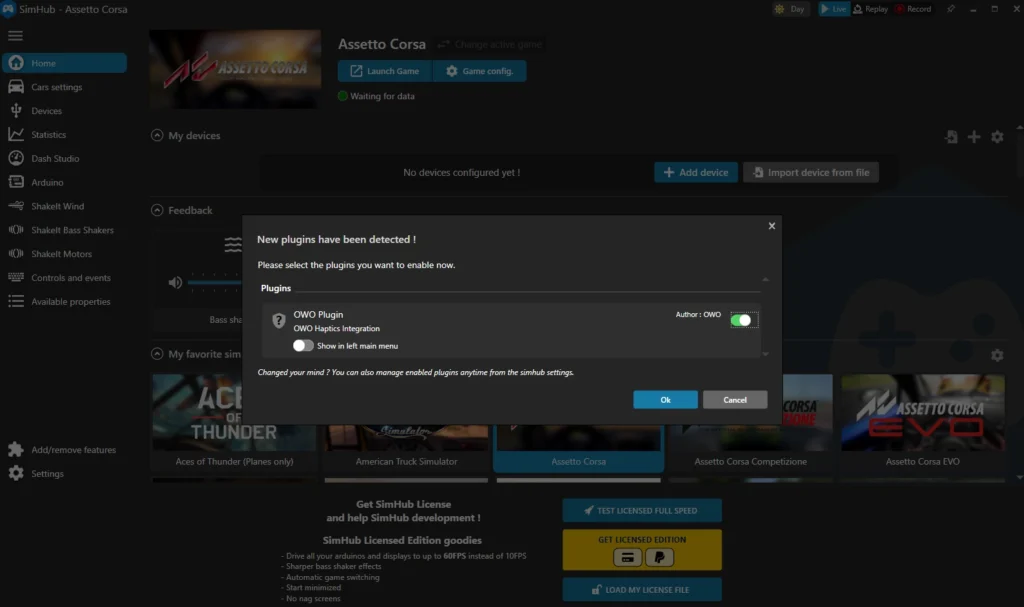
Enable OWO Integration
Open SimHub and enable the OWO Integration Plugin.
Enable OWO Integration Plugin in SimHub

5
Connect your OWO Skin
Download and open MyOWO, then connect and calibrate your OWO Skin.

6
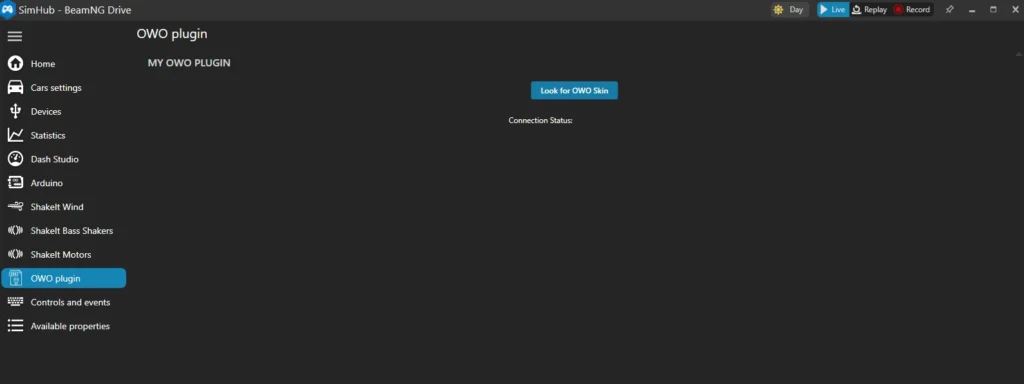
Detect your Skin in SimHub
In SimHub, click Look for OWO Skin to detect your device.
Look for OWO Skin in SimHub

7
Launch HydroSim
Launch the game, then open MyOWO and connect the HydroSim game card to start the haptic experience.

How does the connection work?
SimHub reads the supported vehicle telemetry and sends the corresponding data to the OWO integration. MyOWO then connects the game experience with your paired OWO Skin.

THE EXPERIENCE

What does HydroSim feel like with OWO Skin?

HydroSim turns vehicle telemetry into physical feedback. As the vehicle accelerates, changes direction, hits something, builds RPM or brakes, the haptic response can change with it.

SPEED + STEERING

Feel the vehicle react as you drive

The faster the vehicle moves, the stronger the physical response can become. The active muscle zones can also change according to the vehicle’s direction, while steering modifies how that feedback is distributed across the body.

IMPACTS

The harder the impact, the stronger the response

Impact intensity follows the strength of the collision, allowing smaller contacts and stronger crashes to generate different levels of physical feedback.

RPM

Feel the engine build through the gears

Engine revolutions can generate physical feedback after changing gear, adding another layer to the relationship between acceleration, RPM and vehicle movement.
BRAKING

Feel the pressure when you slow down

Braking creates pressure across the chest, recreating part of the sensation of the restraint pushing against your body as the vehicle decelerates.

DYNAMIC TELEMETRY

The sensation changes with what the vehicle is doing

OWO Skin does not need to repeat the same effect every time something happens. Through SimHub, intensity and active muscle zones can change according to supported telemetry, allowing different driving events to have their own physical character.

SPEED
More speed, more intensity
STEERING
Direction changes the response
IMPACTS
Strength follows the collision
BRAKING
Pressure builds across the chest

BUILT AROUND THE DRIVE

The vehicle changes. The physical feedback changes with it.

Speed, steering, impacts, RPM and braking all represent different parts of driving. Through SimHub, OWO Skin turns supported telemetry changes into physical feedback that follows what the vehicle is doing.

Need help installing mods?

Connect with other developers and get support in the OWO Discord community

Join our Discord

Or get personal help from us!

Choose your edition

Cart

Your cart is currently empty.

Return to shop

We accept

Secure Checkout

Shopping is always safe and secure

Easy returns

you can request a return within 14 days of delivery

Need more help? Email us or call (+34) 672712281

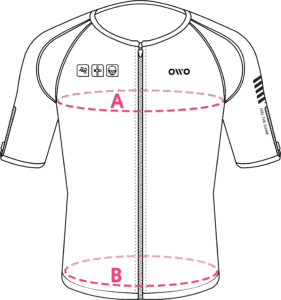
Measure your chest (A) and hips (B) following our indications. 

The reference measurement will always be the larger of the two (A or B).

Look in the chart to which size corresponds to that measurement.
Size chart
SizeReference measurements
 InchesCentimeters
2XS25.6 – 29.465 – 74
XS29.5 – 32.675 – 82
S32.7 – 36.183 – 91
M36.2 – 39.792 – 100
L39.8 – 42.8101 – 108
XL42.9 – 46.3109 – 117
2XL46.4 – 49.9118 – 126
3XL50 – 53127 – 134
4XL53.1 – 55.9135 – 142